Description
Specification
|
How to use in temperature mode
|
|
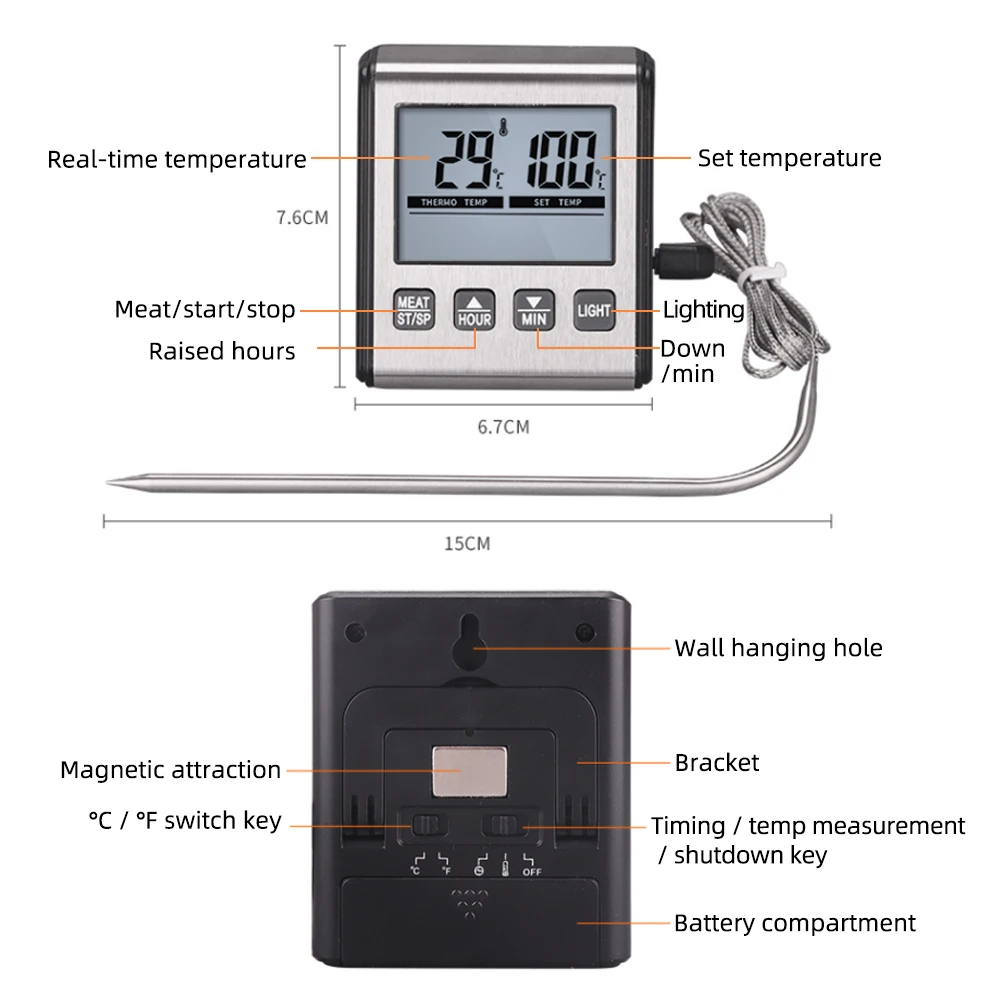
1: Toggle the switch on the back of the product to switch gears and enter the temperature mode.
2: lnsert the probe into the right interface of the thermometer,press the MEAT key. the LCD displays six types of meat, press andkeys to select the meat.then press MEAT key to confirm. 3:Temperature alarm setting: Insert the probe into the food,the food temperature is displayed on the left side of the LCD, and the right side is the preset alarm temperature. Press the key to adjust the alarm temperature upwards, and press the V key to adjust the alarm temperature downwards. When the current temperature is greater than or equal to the alarm temperature value, the alarm will ring and the backlight will flash at the same time.Press theMEAT button to stop the alarm. 4:Toggle the C/ F function on the back of the unit to switch between C and F temperature display. 5:Press the LIGHT key to turn on the backlight. (Automatically turn off the backlight after 5 seconds). |
|
How to use in timer mode
|
|
1:Toggle the switch on the back of the thermometer to switch gears and enter the timer mode.
2:LCD display 0 (HR): 00 (MIN), press HOUR key to adjust the hour value, press MIN key to adjust the minute value; (press HOUR and MIN keys at the same time to clear the value). 3:Press the ST/SP key to turn on the timekeeping mode. 4:Press the LIGHT key to turn on the backlight. (Automatically turn off the backlight after 5 seconds). |
Product Description



Reviews
There are no reviews yet.